Your cloud provider lists '1x H100' but doesn't tell you if you're getting the whole card or a MIG slice. Here's how to tell the difference, and why it changes everything about your workload.
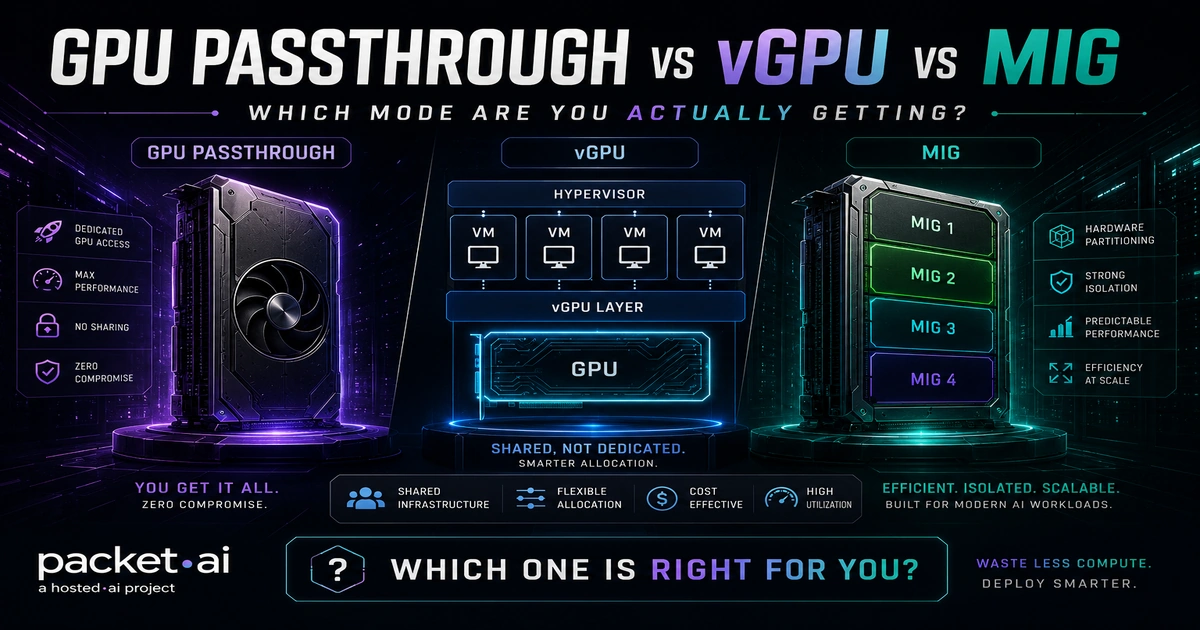
GPU passthrough assigns the entire physical card to one VM with near-native performance; NVIDIA vGPU splits it in software across multiple tenants; and NVIDIA MIG partitions it in silicon for hardware-guaranteed isolation. The mode your cloud provider uses determines your actual performance, not just the GPU model on the pricing page.
Key takeaways
When a GPU cloud provider lists "1x H100" on a pricing page, that line item does not tell you what you are actually getting. One provider gives you the full physical card via GPU passthrough with nothing between your process and the silicon. Another time-slices a vGPU across three tenants. A third carves the card into MIG instances where you get one seventh of the GPU at hardware-guaranteed isolation. The benchmark numbers, the VRAM spec, and the price all look similar. The actual compute is not.
This post explains what each mode is, how it works technically, what it costs you in performance and flexibility, and what packet.ai actually uses, so you can ask the right questions before you commit. For a full comparison of A100 vs H100 MIG partition behavior and single-card inference benchmarks, see the A100 vs H100 guide on packet.ai.
GPU passthrough, formally called PCIe passthrough or VT-d passthrough, uses the CPU's IOMMU (Input-Output Memory Management Unit) to route a physical GPU directly to a single virtual machine. The VM's driver talks to the GPU hardware without any intervening software virtualization layer. From the GPU's perspective, it is running bare metal.
The result is near-native performance. Passthrough delivers maximum raw performance but eliminates sharing, which means utilization collapses when a workload finishes, and live VM migration is not supported on most hypervisors without stopping the instance first. That last point matters for cloud operations: a VM with a passed-through GPU cannot be migrated live between hosts without stopping it first.
For AI and ML workloads, passthrough is the gold standard. The entire GPU's VRAM, compute units, memory bandwidth, and NVLink interconnect belong to one workload. No time-slicing, no contention, no neighbor interference at the GPU level.
GPU passthrough on KVM delivers 98 to 100 percent of bare metal GPU performance; Xen and VMware ESXi deliver 96 to 99 percent, according to widely cited benchmark research by Walters et al. on CUDA and OpenCL workloads.
packet.ai A100 instances with GPU passthrough are available from $1.43/hr. The same silicon on AWS p4d costs $4.10/hr at on-demand rates, a 187% premium for an identical physical GPU delivered via the same passthrough mechanism.
NVIDIA vGPU (virtual GPU) is a software stack that divides one physical GPU into multiple virtual GPU instances, each assigned to a different virtual machine. From the guest OS perspective, a vGPU looks and behaves like a discrete NVIDIA GPU. It runs the full NVIDIA driver and supports GPU-accelerated workloads without modification.
There are two distinct sharing mechanisms under the vGPU umbrella:
Time-sliced vGPU gives each tenant a fixed allocation of GPU memory but time-shares the compute engines. Each vGPU gets full access to streaming multiprocessors for a specific time slice, while multiple active tenants see throughput vary proportionally. Work gets scheduled 480 or 960 times per second depending on how many vGPUs are configured. When only one tenant is active, they get the full card.
MIG-backed vGPU sits on top of a MIG partition. The underlying MIG instance provides hardware isolation; the vGPU software layer provides the driver compatibility. This combines MIG's isolation guarantees with vGPU's guest OS experience.
⚡ Note
NVIDIA vGPU requires a paid software license: either a standalone subscription or through NVIDIA AI Enterprise. This license cost sits on top of the GPU hardware cost and is a recurring expense. Many GPU cloud providers absorb this cost silently; others pass it through. It is worth asking.
vGPU is the right tool for virtual desktop infrastructure (VDI), shared development environments, and workloads where multiple light users need GPU access from a single card. It is poorly suited to production AI inference or training runs where consistent GPU throughput matters. The time-slicing introduces throughput variance that scales with the number of active tenants.
Multi-Instance GPU (MIG) is hardware-level partitioning introduced with NVIDIA's Ampere architecture and extended in Hopper and Blackwell. Where vGPU shares GPU resources in software, MIG partitions the physical GPU in silicon. Each MIG instance gets its own dedicated compute engine, memory controller, and memory bandwidth. Hardware enforces the isolation rather than the driver or the hypervisor.
MIG is supported on data center-class GPUs only. Consumer GPUs, L40S, and T4 do not support MIG. The supported lineup as of mid-2026 is: A100 (40GB and 80GB), A30, H100 (all variants), H200 141GB, B100, B200 180GB, and GB200.
Each GPU supports a fixed maximum of 7 MIG instances. Profile sizes are defined by the architecture and cannot be set arbitrarily:
⚠ Watch out
MIG profile names look similar across GPU generations but the memory allocations differ. A "1g.10gb" on an H100 is a "1g.18gb" on an H200 and a "1g.23gb" on a B200. Manifests or configs that hardcode profile names will fail when moving between GPU generations. Always check the specific GPU's documented profile list before designing a partition layout.
MIG configuration happens at the command line via nvidia-smi. Reconfiguring a partition requires destroying existing instances and recreating them. There is no live resize. Most teams avoid MIG in practice not because the isolation is wrong for them but because the operational overhead stops them cold.
packet.ai uses GPU passthrough for every full-card instance across all tiers. Your workload runs in a KVM virtual machine with IOMMU isolation, talking to the physical GPU directly. No time-slicing, no fixed MIG partition, no NVIDIA AI Enterprise license overhead.
The Dynamic tier is where the architecture gets interesting. Rather than using MIG or vGPU to share cards, packet.ai's intelligent GPU scheduler co-locates workloads based on live resource consumption profiles. A memory-heavy inference job and a compute-heavy training job can run on the same host without contention because they stress different GPU dimensions at different times. The full 192GB of VRAM on a B200 or the full 80GB on an H100 stays available to each workload, with no slice tax.
packet.ai Dynamic PODs deliver full-card B200 instances from $3.75/GPU-hr versus $5.90/GPU-hr for Dedicated single-tenant PODs, without reducing the VRAM or compute available to each workload.
Why this matters to your workload
A MIG 1g.10gb slice on an H100 gives you 10GB of HBM and one seventh of the compute. You cannot run a 70B model or a full fine-tune on it. A passthrough-based Dynamic POD on the same H100 gives you 80GB and the full compute. The pricing may look similar on a comparison page. The capability is not.
The post on bare metal GPU servers vs virtualized GPU cloud covers the full cost and performance comparison between packet.ai's tiers.
The right mode depends on three things: how much of the GPU your workload actually needs, whether you share infrastructure with other teams, and whether your compliance posture requires hardware-level isolation between tenants.
✓ Passthrough is right for
✓ MIG is right for
vGPU is the right answer for very few AI workloads in 2026. Its primary use case is VDI and shared development environments where many users need light GPU access from a single card. For training or inference, the time-slicing overhead and the recurring license cost make it the weakest of the three options.
If you are evaluating GPU cloud providers, the single most useful question is: does my instance get the full physical GPU via passthrough, or am I getting a MIG slice or a vGPU profile? A provider that cannot answer that question clearly is using MIG or vGPU and hoping you do not notice.
Last reviewed: 17 July 2026. See how packet.ai's GPU tiers compare on the bare metal GPU servers page or browse full-card instances on packet.ai clusters.
Same models. Same API. Fraction of the cost. Start free — no credit card required.
Start Building →