
CUDA out of memory is rarely random: the error names its own cause. Read the five numbers in the message first, then work through nine fixes from free to expensive.
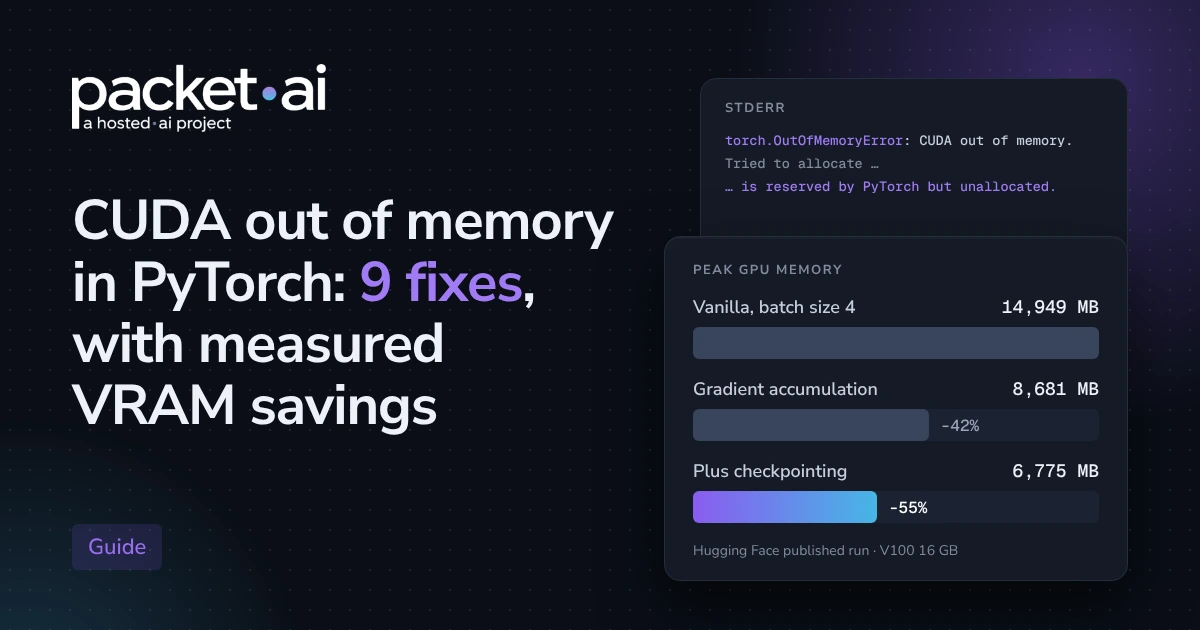
CUDA out of memory means PyTorch asked for more GPU memory than was free, and in Hugging Face's published run gradient accumulation cut peak use from 14,949 MB to 8,681 MB while gradient checkpointing took it to 6,775 MB.
Key takeaways
14,949 MB to 8,681 MB with gradient accumulation and to 6,775 MB with gradient checkpointing added.18 bytes per parameter plus activations, and 8-bit AdamW cuts optimizer state from 8 bytes to 2 bytes per parameter.65B parameter model from more than 780 GB to 48 GB in the original paper.CUDA out of memory stops a PyTorch job when one allocation asks for more GPU memory than is free. The right fix depends on which number in the error is too large. This guide orders nine fixes from free to expensive, so you stop changing code that is not the problem.
Every memory figure here comes from Hugging Face documentation, PyTorch documentation or the QLoRA paper. None of it is from a packet.ai benchmark run, and each figure is labelled with its source.
This post is part of our fine-tuning series. If you are still choosing a card, start with the best GPU for fine-tuning LLMs. For how much memory a specific model needs, the VRAM requirements guide covers sizing, and this post stays on debugging.
The order follows cost: free configuration changes first, then changes that trade speed for memory, then changes that trade accuracy risk for memory. Skip ahead only if the error message points you there.
Depending on the PyTorch version, you will see the exception named torch.cuda.OutOfMemoryError or torch.OutOfMemoryError, and older releases raised a plain RuntimeError. The message format is the useful part. It has five numbers, and each one points at a different fix.
torch.OutOfMemoryError: CUDA out of memory. Tried to allocate <X>.
GPU 0 has a total capacity of <T> of which <F> is free.
Process <PID> has <P> memory in use.
Of the allocated memory <A> is allocated by PyTorch,
and <R> is reserved by PyTorch but unallocated.
If reserved but unallocated memory is large try setting
PYTORCH_CUDA_ALLOC_CONF=expandable_segments:True to avoid fragmentation.To see where memory goes, record the peak allocated memory around one training step. The same snippet gives you a before and after number for every fix below.
import torch

torch.cuda.reset_peak_memory_stats()
# run one training step here
peak_gib = torch.cuda.max_memory_allocated() / 2**30
print(f"Peak allocated: {peak_gib:.2f} GiB")
print(torch.cuda.memory_summary())Run nvidia-smi and compare used memory with what your own job should need. If another process holds a large share, stop it, or point your job at a different card with CUDA_VISIBLE_DEVICES.
nvidia-smi
CUDA_VISIBLE_DEVICES=1 python train.pyDelete variables that still hold the model, optimizer or outputs, then collect garbage and release cached blocks. The PyTorch docs are explicit that empty_cache makes memory visible to other applications and may reduce fragmentation, but does not increase the memory PyTorch can use. Hugging Face also advises restarting the Python kernel between experiments.
import gc
import torch

del model, optimizer, outputs   # drop every reference first
gc.collect()
torch.cuda.empty_cache()If the reserved but unallocated figure in the error is large, set the allocator option that the error message itself suggests. Set it before the process starts.
export PYTORCH_CUDA_ALLOC_CONF=expandable_segments:True
python train.pyForward activations depend mostly on sequence length, hidden size and batch size, according to Hugging Face. Halve the batch size or shorten sequences first. Hugging Face also points out that if your preferred batch size already fits, memory-saving techniques only slow training down.
Gradient accumulation runs smaller batches and applies the optimizer step after several of them. It costs extra forward and backward passes, so training gets somewhat slower.
In Hugging Face's published run on bert-large-uncased, moving from batch size 4 to batch size 1 with 4 accumulation steps cut GPU memory from 14,949 MB to 8,681 MB, about 42% lower.
# Hugging Face Trainer
training_args = TrainingArguments(
    per_device_train_batch_size=1,
    gradient_accumulation_steps=4,
    output_dir="out",
)

# Plain PyTorch
accum_steps = 4
optimizer.zero_grad()
for step, batch in enumerate(loader):
    loss = model(**batch).loss / accum_steps
    loss.backward()
    if (step + 1) % accum_steps == 0:
        optimizer.step()
        optimizer.zero_grad()
Rule of thumb
Keep the largest per-device batch that fits and raise the accumulation steps. For an effective batch of 64 where 4 fits, Hugging Face recommends a per-device batch of 4 with 16 steps rather than 1 with 64.
Mixed precision mainly speeds up training. Hugging Face notes that memory use can go up with a large model at a small batch size, because the weights then exist in both 16-bit and 32-bit form. It helps most with a small model and a large batch. Hugging Face notes that some GPU architectures, such as Ampere, offer bf16.
import torch

with torch.autocast(device_type="cuda", dtype=torch.bfloat16):
    loss = model(**batch).loss
loss.backward()Normally every activation from the forward pass is kept for the backward pass. Gradient checkpointing keeps a subset and recomputes the rest, trading time for memory. Use it when batch size 1 with accumulation still fails.
# Hugging Face models
model.gradient_checkpointing_enable()

# or in TrainingArguments
TrainingArguments(per_device_train_batch_size=1,
                  gradient_accumulation_steps=4,
                  gradient_checkpointing=True,
                  output_dir="out")
Adding gradient checkpointing to that Hugging Face run lowered memory again to 6,775 MB, about 22% below the accumulation run, and raised epoch time from 66.03 to 85.47 seconds.
How to read these numbers
These are Hugging Face's published measurements, not a packet.ai run. The model is bert-large-uncased with sequence length 512 for one epoch on a 16 GB V100, and the figures are device memory including about 1.3 GB of CUDA kernels. Absolute megabytes will differ on your GPU and model. The ratios are the useful part, and the snippet in the error section lets you measure your own.
Optimizer state is a fixed cost per parameter. Hugging Face lists 8 bytes per parameter for AdamW, 4 bytes for SGD with momentum and 2 bytes for 8-bit AdamW from bitsandbytes.
Hugging Face's training guide puts mixed-precision AdamW at 18 bytes per parameter plus activations, and 8-bit AdamW cuts optimizer state from 8 bytes to 2 bytes per parameter.
import bitsandbytes as bnb

optimizer = bnb.optim.AdamW8bit(model.parameters(), lr=2e-5)
Check validation results on your own task after the switch. The QLoRA authors also use paged optimizers, available as the paged_adamw_32bit option in their repository, to absorb memory spikes.
When the weights alone do not fit, shrink them. QLoRA loads the base model in 4-bit NormalFloat and trains small adapters on top. The paper reports that this cut the average memory needed to fine-tune a 65B parameter model from more than 780 GB to 48 GB, and double quantization saves about 0.37 bits per parameter.
import torch
from transformers import AutoModelForCausalLM, BitsAndBytesConfig

bnb_config = BitsAndBytesConfig(
    load_in_4bit=True,
    bnb_4bit_quant_type="nf4",
    bnb_4bit_use_double_quant=True,
    bnb_4bit_compute_dtype=torch.bfloat16,
)
model = AutoModelForCausalLM.from_pretrained(
    "your-model-id",
    quantization_config=bnb_config,
    device_map="auto",   # spills layers to CPU if the GPU is full
)
Offloading layers to the CPU through device_map saves GPU memory at a speed cost, so treat it as a last resort. For the full comparison of cards, see our A100 vs H100 for fine-tuning LLMs post.
Move up when batch size 1 with checkpointing and quantization still fails, or when the time cost of accumulation and checkpointing outweighs the price of more memory. A card with more VRAM also removes the need for fixes 5 to 9 on many jobs.
On packet.ai
As of 10 November 2026, the RTX 6000 Pro on packet.ai lists 96 GB of GDDR7 from $0.66 per GPU-hour on Dynamic, or $299 per month flat. Check the product page for current rates before you commit.
Sources
16 GB, sequence length 512)Last reviewed: 10 November 2026. If a bigger card is the right call, browse available clusters on packet.ai.
Same models. Same API. Fraction of the cost. Start free — no credit card required.
Start building →