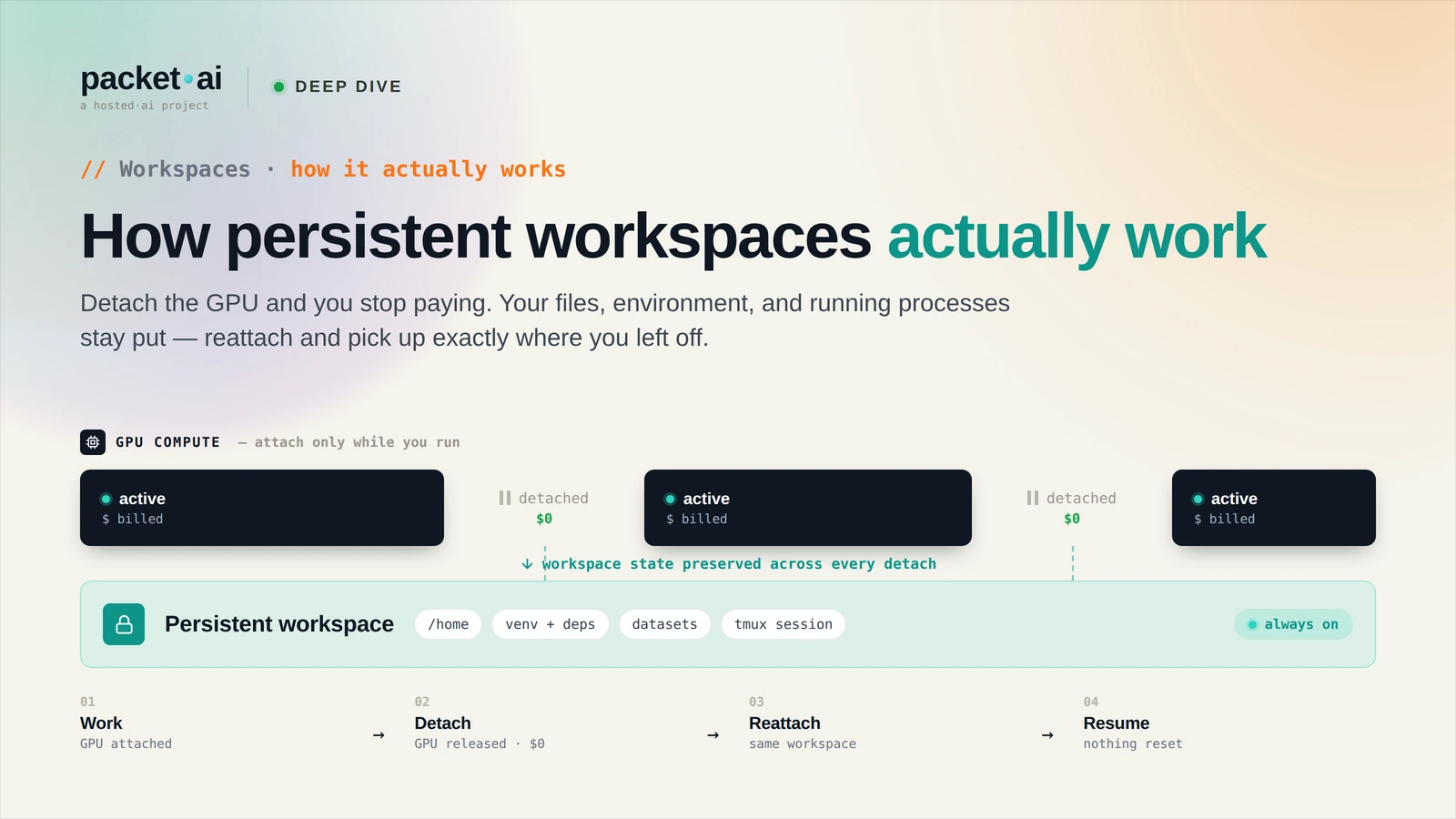
Persistent Workspaces keep your files, packages, and models intact when you stop and restart your instance, so you can resume right where you left off.
packet.ai persistent workspaces keep your environment, installed packages, datasets, and model checkpoints across sessions - your GPU pod restarts exactly where you left it.
Key takeaways
When you stop and restart a packet.ai GPU instance, the following persists:
/home/ubuntu - your home directory/home/ubuntu/miniconda3 or /opt/conda~/.cache/huggingface).bashrc, .vimrc, SSH authorized keys)What does not persist across a full instance termination (as opposed to stop/restart):
apt outside the home directory/tmp or other non-home pathsThe key distinction: stop/restart preserves everything. Termination preserves the home directory volume but not system-level changes. Use snapshots to capture system-level state before terminating if you need it.
packet.ai instances use a two-layer storage model:
Container image layer: The base OS, CUDA drivers, pre-installed frameworks (PyTorch, TensorFlow, JupyterLab). Read-only during normal operation. Updated when packet.ai releases new base images. You can update the base image without losing workspace data.
Persistent volume: Mounted at /home/ubuntu (and optionally at additional mount points). NVMe-backed. Survives stop/restart cycles. Not affected by base image updates. This is where your work lives.
The separation means you can pull a new base image with updated CUDA 12.5 support without re-downloading your 70B model weights or re-running your environment setup.
The persistent volume is NVMe local storage, not network-attached. Sequential read speeds are typically 3-5 GB/s, sequential write 2-4 GB/s. Random read IOPS are in the range of 500k-1M depending on the instance type.
Practical implications:
Snapshots capture the full disk state of a running or stopped instance - the base image plus the persistent volume - and package it as a launchable image. Use cases:
Environment cloning: Set up a fully configured environment once (conda env, packages, config), snapshot it, and launch new instances from that snapshot. New instances start with your environment already in place - no setup time.
Recovery points: Before a risky operation (major package upgrade, system configuration change), take a snapshot. If the change breaks something, roll back to the snapshot.
Sharing environments: Share a snapshot with a teammate. They launch a new instance from your snapshot and get the identical environment without replicating your setup steps.
To create a snapshot from the dashboard: go to your instance, click "Snapshot", give it a name. The snapshot creates in under 5 minutes for most instance sizes. Snapshots are visible in the dashboard under "Images" and can be used to launch new instances from the standard instance creation flow.
Use conda environments for package isolation. Instead of installing packages to the base Python, create named conda environments. This lets you maintain multiple isolated environments (one per project, or one per framework version) without conflicts.
conda create -n llama-env python=3.11
conda activate llama-env
pip install transformers vllm accelerate
Pin your HuggingFace cache location. By default, HuggingFace downloads models to ~/.cache/huggingface. This is in your persistent home directory. Set HF_HOME explicitly if you want to control the cache location:
export HF_HOME=/home/ubuntu/.cache/huggingface
Add this to .bashrc so it applies on every session start.
Checkpoint frequently if training. Training jobs that checkpoint every epoch are recoverable from the last checkpoint if the instance is interrupted. Jobs that checkpoint every 10 epochs lose more progress on interruption. NVMe write speed is fast enough that checkpoint frequency is a recovery strategy question, not a performance question.
Snapshot before major changes. Before upgrading a framework, installing a conflicting package, or changing system configuration, snapshot. The snapshot takes under 5 minutes and gives you a rollback point without having to rebuild the environment from scratch.
Workspace storage is included in the GPU hourly rate up to 2 TB per instance. For most training and inference workloads - including full 70B model weights, a large dataset, and checkpoint history - 2 TB is sufficient.
For workloads requiring more than 2 TB (large pretraining datasets, full model weight libraries), contact packet.ai support to discuss expanded storage options. Object storage (S3-compatible) is available for cold storage of dataset archives and model weight backups at $0.018/GB-month hot and $0.004/GB-month cold.
Same models. Same API. Fraction of the cost. Start free — no credit card required.
Start Building →