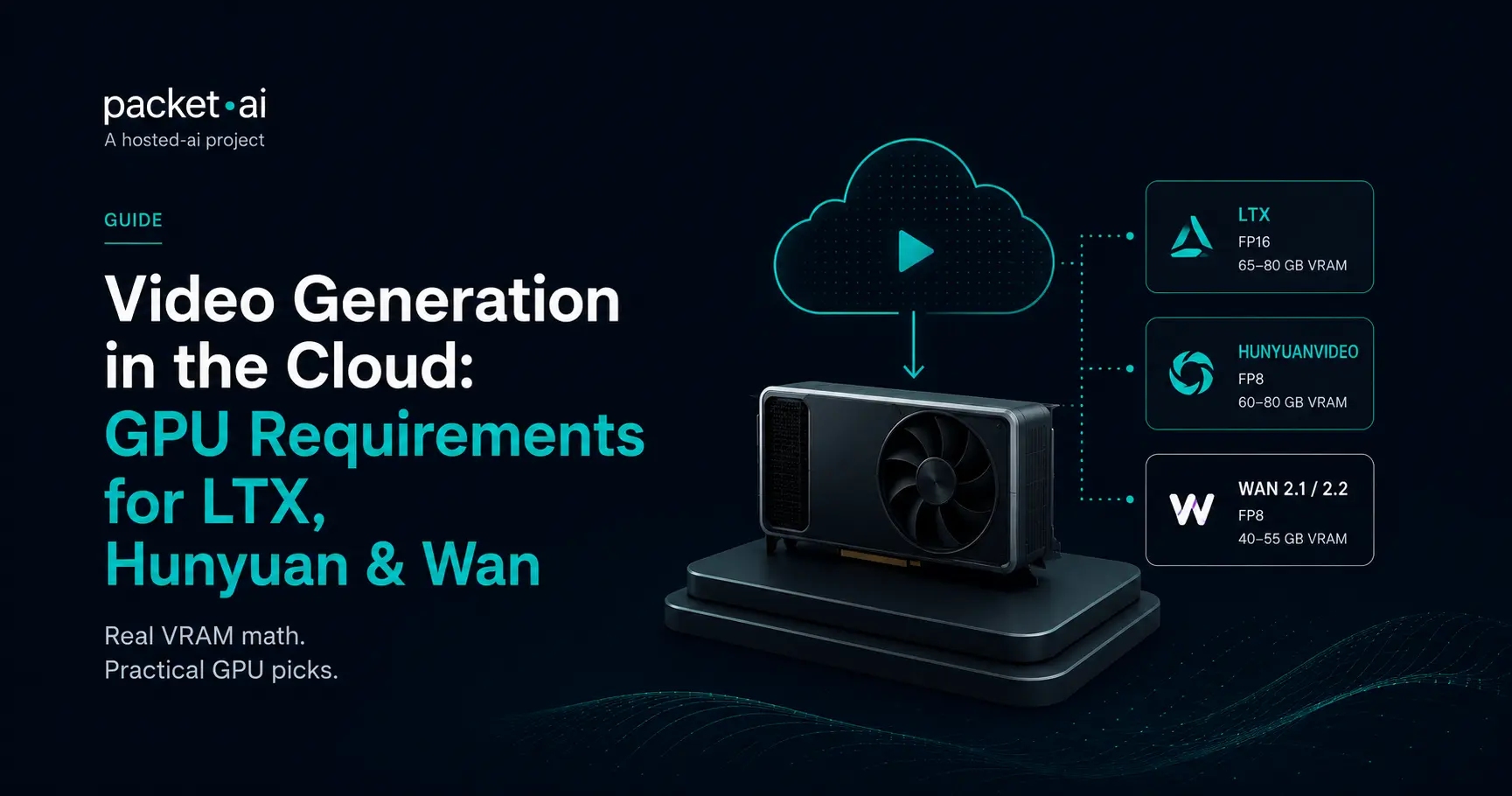
HunyuanVideo 1.5 needs a fraction of what the original HunyuanVideo requires, despite sharing the same name. Here's the real VRAM math for every major video model.
Video models don't fail because they're too large. They fail because most people size them like image models. HunyuanVideo 1.5 needs a fraction of what the original HunyuanVideo requires, despite sharing the same name, and that's just the first surprise in sizing GPU for LTX, Wan, or Hunyuan.
Key takeaways
Anyone who's sized a GPU for an LLM or an image model gets a rude surprise the first time they check requirements for video. The jump isn't incremental, it's categorical, and conflating a video model's easiest configuration with its full-quality default is where most people end up either overpaying or hitting an out-of-memory error mid-render.
A single 1024×1024 image is roughly 1 million pixels. A 5-second clip at 24fps is 120 frames, or about 120 million pixels, and the model has to hold temporal context across those frames to keep motion coherent, not just generate each one independently. That's the core reason video diffusion models multiply VRAM requirements by roughly 3 to 10 times compared to an image model with a similar parameter count.
This is also why quantization matters more for video than almost anywhere else in generative AI. FP8 quantization typically cuts VRAM by 50-70%, and the visual quality difference is minimal at 480p-720p in most comparisons. For video specifically, the choice usually isn't between quality and no quality, it's between the full-precision default most people never actually need and a quantized version that runs on hardware people already have.
This is the single most common point of confusion in video generation sizing. Tencent has released two models both called HunyuanVideo, and they have wildly different hardware requirements.
⚡ Note
If someone says "HunyuanVideo runs on 14GB," they mean version 1.5, released November 2025 as a deliberately lighter, smaller-parameter rebuild, not the original 13B model. The original at FP16 sits close enough to 80GB that even an 80GB card carries real out-of-memory risk during generation spikes. Confirm which version a guide is describing before sizing hardware around it.
The original HunyuanVideo remains the higher-quality option for facial detail and identity consistency. HunyuanVideo 1.5 trades some of that for accessibility, and is the more practical starting point unless your use case specifically needs the original's fidelity.
Wan's 14B model follows a similar pattern to Hunyuan's original: real weight at FP16, but a genuinely usable range once quantized.
At full precision, a consumer RTX 4090 (24GB) or even an RTX 5090 (32GB) simply can't run Wan's 14B model at 720p, that's not a performance limitation, it's a hard VRAM ceiling. Wan 2.2 succeeds 2.1 with better temporal coherence and a smaller 5B TI2V variant that's genuinely more accessible on consumer hardware, at similar VRAM to the 2.1 generation for the full 14B model.
LTX-2.3 splits cleanly into two practical tiers, and the gap between them is the widest of any model in this guide.
⚡ Note
LTX-2.3's own documentation states the standard model requires 80GB+. The distilled variant with FP8 quantization runs on 32GB consumer GPUs like the RTX 5090. There's no middle ground, you're choosing between one of two very different hardware tiers, not a sliding scale.
The distilled model isn't a stripped-down demo, it's the officially recommended starting point for anyone without 80GB of VRAM, using 8-step inference and a lower memory footprint by design. LTX-2.3's real differentiator is native audio-video generation in a single forward pass, plus IC-LoRA conditioning for depth, pose, and edge maps, control options the video-only alternatives need a separate pipeline to match.
⚠ Watch out
Both H100 and H200 are currently listed as coming soon on packet.ai, joinable by waitlist rather than bookable on-demand. For the heaviest video workloads today, B200's 192GB is the largest currently-available option, and its bandwidth advantage matters directly for temporal-consistency workloads like full-precision video generation.
Once you've matched a model to a GPU, the next question is whether you actually want to manage that infrastructure yourself. Everything above assumes you do: pick a GPU, manage the environment, and maintain the pipeline as models update. That's the right call for teams with specific model or workflow needs. For everyone else, a managed option like Pixel Factory, packet.ai's managed image and video generation product, runs on the same underlying GPU fleet without requiring you to size, deploy, or maintain anything yourself.
It's the more practical option if you want video generation output without becoming the person responsible for keeping a Wan or LTX deployment running as new versions ship.
If self-hosting is still the right call for your use case, current rates for every GPU covered in this guide, including B200 for the heaviest workloads, are on the packet.ai pricing page. For sizing an LLM behind a video-generation pipeline that also needs text capabilities, packet.ai's general VRAM requirements guide covers that separately.
Whether you're deploying LTX, Wan, or HunyuanVideo, the biggest sizing mistakes usually come from treating video like image generation. Matching the GPU to your actual workflow, rather than the model's largest published requirement, almost always leads to a better balance of performance and cost.
Last reviewed: July 23, 2026. VRAM figures cross-referenced across multiple independent sources and official model documentation where available. GPU availability confirmed against packet.ai's live pricing page. Quantization method and resolution both significantly affect actual memory use; treat the figures above as planning ranges.
Same models. Same API. Fraction of the cost. Start free — no credit card required.
Start building →