The racks are installed and the GPUs are sitting idle. These are the seven planning errors that stand between your hardware and a first payout, and how to avoid each one.
packet.ai Team
October 30, 2026
Idle GPU to revenue works when you avoid seven mistakes: applying with a setup that will not qualify, treating the 2.5x sales average as a guarantee, skipping the power math, locking every GPU into one deal, treating the hardware test as a formality, expecting cash before the payout cycle, and having no plan to take capacity back.
Key takeaways
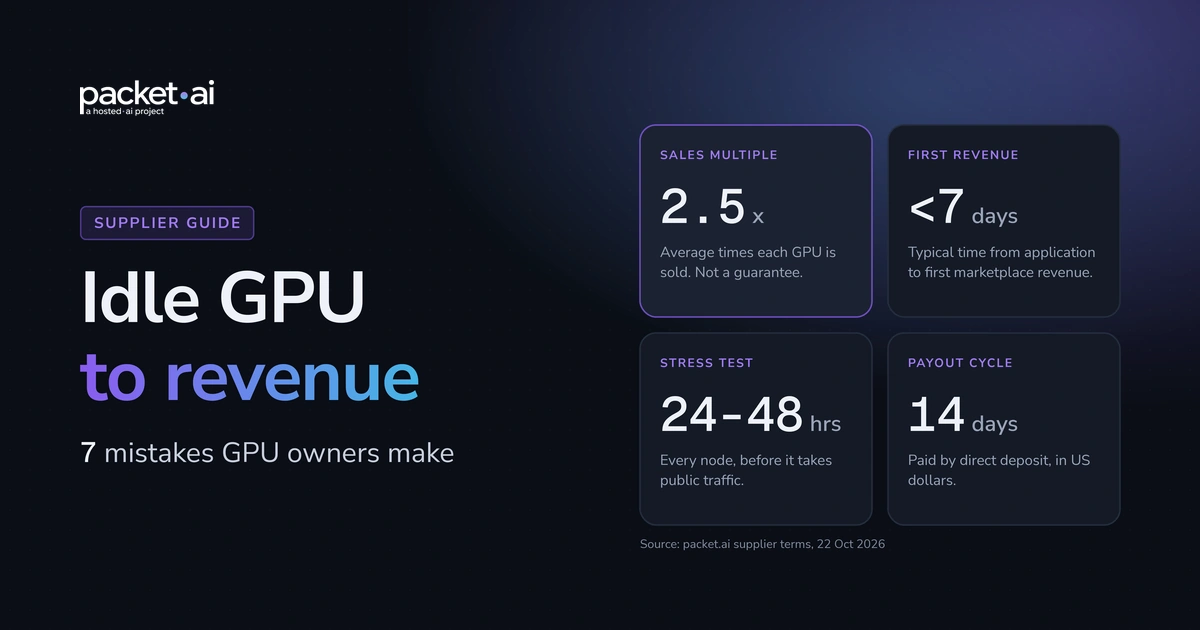
packet.ai reports 2.5 as the average number of times each GPU has been sold, and states it is not a guarantee for any single card or rack.
Applications are reviewed within 2 business days, and every node passes a 24 to 48 hour stress test before it takes public traffic.
Payouts are bi-weekly, every 14 days, in US dollars by direct deposit.
NVIDIA rates an H100 SXM at up to 700W and a DGX B200 system at about 14.3 kW maximum, so power belongs in your model from day one.
You can withdraw capacity at any time with no financial penalty, but occupied GPUs need 14 days of notice.
Reviewed 22 October 2026 against packet.ai's published supplier terms and NVIDIA datasheets.
Turning idle GPU to revenue sounds like a hardware problem. In practice, most delays come from planning errors made before the first node is installed. This guide covers seven of them, using the supplier terms packet.ai publishes on its for suppliers page.
It is not a customer story, and it contains no payout figures, because those depend on your hardware, region and rate card. If you run racks with no cloud of your own, read how to rent out your GPU in 2026. If you run a neocloud with spare capacity, read how to become a GPU cloud provider.
The seven idle GPU to revenue mistakes at a glance
The seven mistakes are a non-qualifying setup, a misread sales average, missing power math, a single-deal strategy, a rushed hardware test, a payout-timing mismatch and no exit plan. Each has a one-line fix.
Mistakes, fixes and where each fact comes from
Mistake
Do this instead
Source
1. Applying with a setup that will not qualify
Check all eight requirements before you apply
packet.ai supplier page
2. Treating 2.5x as a guarantee
Model a lower multiple and find break-even
packet.ai supplier FAQ
3. Skipping the power math
Size power for the whole system at your own tariff
NVIDIA datasheets
4. Locking every GPU into one deal
Keep anchor tenants and let the scheduler sell the gaps
packet.ai supplier page
5. Treating the hardware test as a formality
Run your own sustained burn-in first
packet.ai supplier page
6. Confusing first revenue with first payout
Plan cash flow around a 14 day cycle
packet.ai supplier page
7. Having no plan to take capacity back
Treat 14 days as a hard lead time
packet.ai supplier FAQ
Mistakes made before you apply for idle GPU to revenue
Three mistakes happen before an application is filed. Each is cheap to fix on paper and expensive to fix once racks are installed.
1. What happens if you apply with a setup that will not qualify?
The application does not move forward. packet.ai onboards the hardware operator, not resellers or brokers, and does not accept home-lab or consumer-grade setups, so renting capacity from someone else or running GPUs in a spare room will not pass review. Check your site against the table below first.
What packet.ai asks suppliers to have in place
Requirement
Stated standard
GPUs
Datacenter-grade NVIDIA GPUs
Environment
A real datacenter or comparable hosting environment
Network
Stable 1 Gbps+ networking
Power
Redundant power, with N+1 ideal
Cooling
Stable cooling
Uptime
99%+ uptime capability
Host operating system
Ubuntu Server 22.04 or 24.04 LTS
Applicant
The hardware operator, not a reseller or broker
A missing row is a reason to fix the site first, not to apply and hope.
2. Is the 2.5x sales average a guarantee?
No. packet.ai states that 2.5 is the average number of times each GPU has been sold, not a guarantee for any single card or rack. The result depends on hardware, location, demand and contract terms, so build your model at a lower multiple and find your break-even point.
Plan for the low case
The supplier calculator lets you lower the multiple and shows your net, including the break-even point.
3. How much does power cost change what a GPU earns?
Power can decide whether a rack is worth listing, because it keeps running while a GPU sits idle. NVIDIA rates an H100 SXM at up to 700W and a full DGX B200 system at about 14.3 kW maximum, so size power for the whole system, then price it at your own tariff.
Monthly energy at rated maximum draw, 720 hours (arithmetic on NVIDIA ratings, illustrative tariff)
System
Rated maximum
Energy per month
Cost at $0.10 per kWh
1 x H100 SXM (GPU only)
0.7 kW
504 kWh
$50.40
8 x H100 SXM (GPUs only)
5.6 kW
4,032 kWh
$403.20
DGX B200 (whole system)
14.3 kW
10,296 kWh
$1,029.60
The $0.10 per kWh tariff is an assumption for illustration only, not a packet.ai or market figure, and real draw varies with workload. Ratings come from the NVIDIA H100 datasheet and the NVIDIA DGX B200 page. Replace the tariff with yours.
For colocation operators, packet.ai points to revenue per kW as the number that matters, because power is the binding constraint. Its supplier calculator shows your net using your own power costs.
Mistakes made during onboarding and your first weeks
The next three show up between approval and the first deposit.
4. Why not put every GPU on one long-term deal?
Because offtake locks your hardware into one buyer at one price. According to the supplier page, margin per GPU-hour falls as you move from hourly to monthly to reserved to offtake, though the page calls that relative margin, not a rate card. Keep anchor tenants where you need them and let the scheduler sell the gaps.
That does not make offtake wrong. Anchor tenants give predictable income. The mistake is committing every GPU before you know what the rest would earn.
5. How long does the hardware test take, and why does it matter?
Every node is tested before it takes public traffic, including a 24 to 48 hour stress test. Your GPUs list, with a New Host badge, only after they pass, so a weak fan or flaky uplink delays your first revenue.
Run your own sustained burn-in on every host first. That way the official test confirms what you already know.
6. When do you get paid after listing your GPUs?
First marketplace revenue typically arrives in under seven days from application, but payouts run every 14 days in US dollars by direct deposit, so the two dates differ. Plan cash flow around the payout cycle, not the first booking.
If a lease or power bill falls due weekly, the gap is yours to cover. Rate cards are tier-based by GPU and shared at onboarding, so ask for yours before you commit to a financial model.
Mistake 7: having no plan to take your GPUs back
You can withdraw capacity at any time with no financial penalty, but if a GPU is occupied, packet.ai asks for 14 days of notice so it can migrate the customer workload. Treat 14 days as a hard lead time when you schedule maintenance or your own launches.
Terms are month-to-month with no minimums or long-term contracts, and you keep root, BMC and physical access. If you may need a rack back for your own customers, put the date in your capacity plan before you list it on the packet.ai supplier marketplace.
The application to payout timeline on packet.ai
From application to first marketplace revenue typically takes under seven days, according to packet.ai. Payouts then follow a fixed 14 day cycle.
Supplier onboarding steps as published by packet.ai
Step
What happens
Timing stated
Apply
You submit your infrastructure details
Day 0
Review
packet.ai checks GPU model, network, power and environment, then agrees month-to-month terms before technical access
Applications reviewed within 2 business days
Connect
You install the lightweight hosted.ai agent and keep root and physical access
Not stated
Test
Every node is tested before it takes public traffic
24 to 48 hour stress test
Go live
Your GPUs list with a New Host badge
Typically under 7 days from application to first marketplace revenue
Get paid
Payouts in US dollars by direct deposit
Every 14 days
A pre-application checklist for idle GPU to revenue
Answer yes to all eight items before you apply, and most of the mistakes above disappear.
You are the hardware operator, not a reseller or broker.
Your site has 1 Gbps+ networking, stable cooling and N+1 power where possible.
Every host runs Ubuntu Server 22.04 or 24.04 LTS.
You have run your own 24 to 48 hour burn-in.
You have priced power for the whole system at your own tariff.
Your model works at a sales multiple below 2.5.
You will ask for your rate card during onboarding.
The 14 day notice period is in your capacity calendar.
If your site clears the list, you can apply as a supplier. Questions first? Email suppliers@packet.ai. The page says replies typically arrive within one business day.
How this was sourced: supplier terms come from the packet.ai for suppliers page, read on 22 October 2026. Power ratings come from NVIDIA datasheets. Nothing here comes from a supplier case study, and the post contains no payout figures.
Frequently asked questions
packet.ai says applicants typically reach first marketplace revenue in under seven days. Applications are reviewed within 2 business days, and every node passes hardware testing, including a 24 to 48 hour stress test, before it takes public traffic. Payouts then arrive every 14 days, so first revenue and first deposit land on different dates.
Datacenter-grade NVIDIA GPUs in a real datacenter or comparable hosting environment, with stable 1 Gbps+ networking, redundant power (N+1 is ideal), stable cooling, 99%+ uptime capability and Ubuntu Server 22.04 or 24.04 LTS hosts. packet.ai onboards the hardware operator, not resellers or brokers, and does not accept home-lab or consumer-grade setups.
No. 2.5 is the average number of times each GPU has been sold on packet.ai, not a guarantee for any single card or rack. The result depends on hardware, location, demand and contract terms. The supplier calculator lets you lower the multiple and shows your net, including where you break even.
NVIDIA rates an H100 SXM at up to 700W of thermal design power, and a DGX B200 system with eight B200 GPUs at about 14.3 kW maximum. Size power and cooling for the whole system, not only the GPUs, and price it at your own electricity tariff before you apply.
Payouts are bi-weekly, every 14 days, in US dollars by direct deposit to your bank account. packet.ai handles billing, invoicing, payment collection and currency conversion. Rate cards are tier-based by GPU and shared during onboarding based on your hardware and region, so ask for yours before building a financial model.
Yes. You can withdraw capacity at any time with no financial penalty. If a GPU is occupied, packet.ai asks for 14 days of notice so it can migrate the customer workload. Terms are month-to-month with no minimums or long-term contracts, and you keep root, BMC and physical access to your hardware.
No. The agent does not transmit customer workload data back to packet.ai. It orchestrates VMs through a defined API, and you can pause it, audit it or pull the plug at any time. You keep full root, BMC and physical access, and packet.ai only contacts you about hardware-level incidents such as a node down or a fan failure.
Last reviewed: 22 October 2026. Supplier terms come from the packet.ai for suppliers page and can change, so confirm them there before you apply.