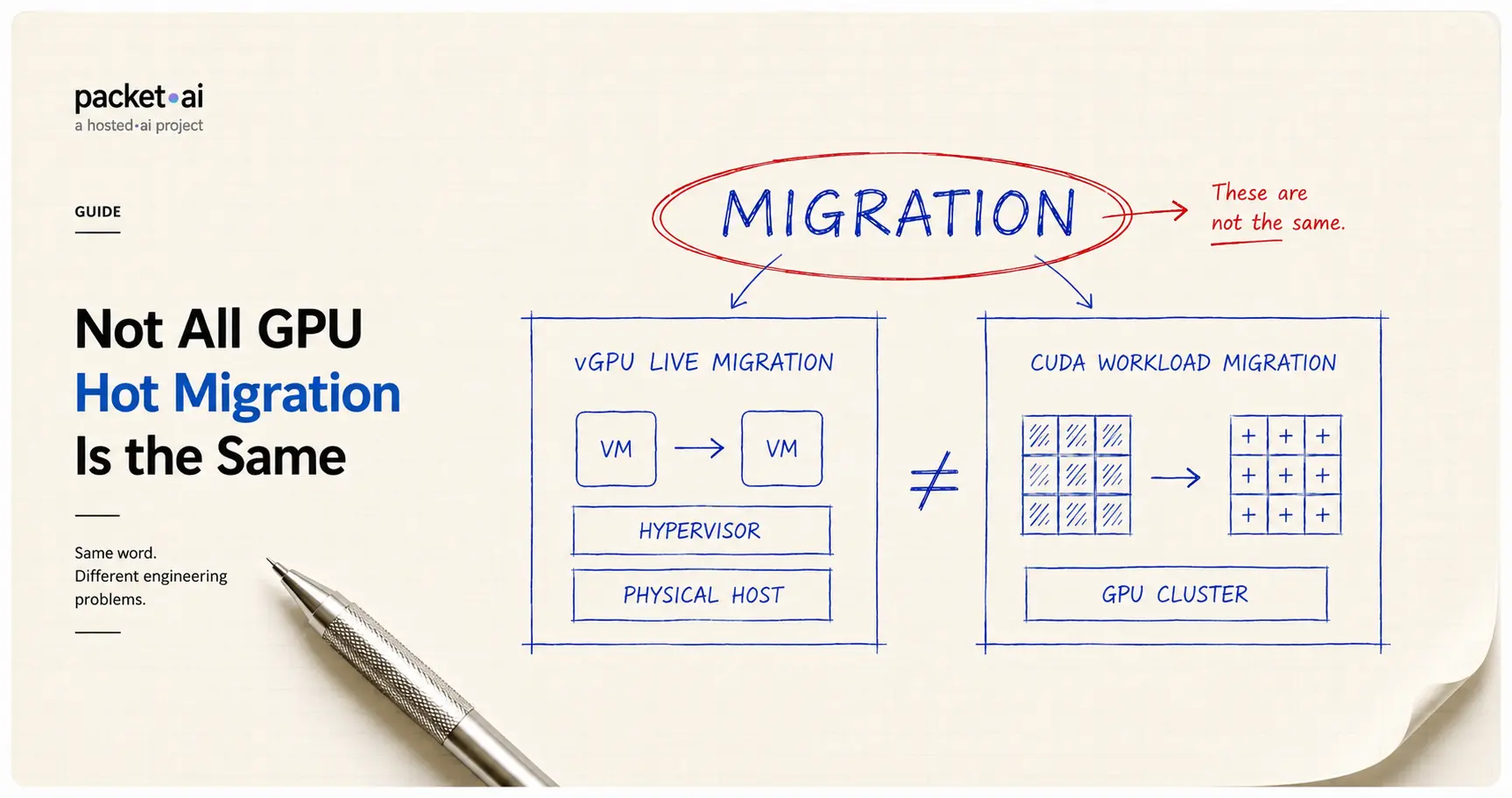
Every shared GPU platform claims 'seamless' migration. Here's what actually happens under the hood, and why vGPU migration and moving a live CUDA workload are not the same problem.
"GPU hot migration" isn't one settled capability. NVIDIA's vGPU live migration for virtual desktops and workstations is mature and well-documented. Migrating a running CUDA training or inference workload between physical GPUs is a much newer, harder problem, one where even the most advanced research systems measure downtime in seconds, not milliseconds.
The core distinction
vGPU live migration and CUDA workload migration are not the same problem. One is a mature, established capability. The other is still an active area of research. Most vendor claims quietly collapse the two into a single word, "migration," and that's exactly where the important details get lost.
Key takeaways
Shared GPU infrastructure lives or dies on one question: what happens to your workload when the platform needs to move it? The honest answer depends entirely on what kind of migration is actually happening, and that distinction rarely makes it into a vendor's marketing copy.
"Hot migration" and "live migration" get used as if they describe one thing. They don't. There are at least two genuinely different problems hiding under the same name.
Confusing the two leads to bad assumptions. A platform that handles one well doesn't automatically handle the other, and a claim like "we migrate workloads live" needs a follow-up question: migrate what, exactly, and how?
NVIDIA's vGPU live migration extends standard VM live migration to cover the GPU. NVIDIA's own documentation describes the goal plainly: move a running virtual machine from one physical server to another with minimal downtime and no loss of data, the same promise VM live migration has made for CPU and memory for years, now extended to graphics state. If you're unclear on how vGPU differs from passthrough or MIG in the first place, packet.ai's guide to GPU passthrough, vGPU, and MIG covers that distinction directly.
This is genuinely mature technology for VDI and enterprise virtualization, used for server maintenance, hardware upgrades, and load balancing without scheduling downtime. But it's worth being precise about where it's mature: this is virtual desktop and workstation territory, not large-scale distributed AI training.
⚡ Note
Even in the mature vGPU world, GPU-aware live migration is newer than people assume. Windows Server 2025 is the first Hyper-V release to support live migrating VMs with a GPU partition attached at all. It requires matching GPU hardware across hosts, IOMMU DMA bit tracking support, and falls back to a slower transport method specifically because GPU device state is more complex to transfer than regular VM memory.
Moving an active training or inference process is harder because there's no hypervisor abstracting the GPU the way there is for a VM. The workload's state, model weights, optimizer state, activations, has to be checkpointed off the source GPU and restored on the destination, and that data transfer takes real, measurable time.
Published research gives a sense of the actual numbers involved. In one academic system evaluating live migration for LLM inference, migrating a Llama 3.3-70B inference workload incurred measurable downtime dominated by copying data from the source GPU to the target, and a comparable system reported 10.2 to 12.35 seconds of downtime for a similar migration. That's not a criticism of any specific system, current research is actively working to reduce these numbers, but it's the honest state of the art: CUDA workload migration measures success in seconds of downtime, not the milliseconds VM live migration users expect.
This is also why time-slicing and checkpoint-based approaches are treated as distinct engineering problems in the research literature, not as a solved feature you flip on.
One genuinely useful pattern shows up across multiple systems: migrating a workload proactively, before hardware actually fails, rather than only reacting after a failure occurs.
This works because most hardware failures aren't instant. Industry data cited by infrastructure teams building this capability suggests roughly 70-80% of hardware failures show detectable symptoms beforehand, rising memory error rates, PCIe communication errors, and similar signals, before the actual failure happens. A platform that watches for these signals can move a workload off degrading hardware before it dies, rather than recovering after the fact.
This distinction matters for evaluating any platform's migration claims: reactive failover (restart after failure) and predictive migration (move before failure) are different capabilities with very different impacts on your workload's continuity.
On genuinely shared GPU infrastructure, migration capability is the mechanism that determines whether "your workload got moved" is invisible or catastrophic. A platform with no real migration story either pins your workload to one physical GPU indefinitely (limiting flexibility) or risks your job dying outright when hardware needs to change under it. This connects directly to the noisy neighbor problem on shared GPUs: migration is one of the tools a platform can use to move a workload away from contention before it degrades your p99, rather than leaving you stuck next to it.
The honest questions worth asking any shared GPU provider: what exactly gets migrated, how much downtime does that migration cause for your specific workload type, and is migration reactive (after something breaks) or proactive (before it does)? Vague claims like "seamless" or "invisible" migration deserve a specific answer to those three questions before you trust them for production traffic.
packet.ai's dynamic placement scheduler continuously tracks GPU usage across multiple dimensions in real time, VRAM, SM activity, memory bandwidth, compute throughput, rather than treating a GPU as simply occupied or free. When actual usage patterns shift and contention would start to affect performance, workloads are moved or queued automatically, with performance prioritized over squeezing in more density.
The design principle behind this is the one worth holding any shared GPU platform to: the system should never degrade a workload to pack more jobs onto the same hardware. From the workload's perspective, well-executed placement should feel like running on a dedicated GPU, full VRAM, full compute, no interference from what else is happening on the same physical card.
packet.ai's Dynamic PODs is where this placement approach actually runs: the scheduler that decides when and how to move a workload is the same mechanism this whole post has been describing in the abstract. If you're evaluating whether Dynamic's claims hold up against the questions raised above, that's the product page with the current specifics.
For more on how this scheduling approach compares to hard partitioning like MIG, packet.ai's technology page covers the mechanism directly. If you're running workloads across multiple nodes rather than a single GPU, packet.ai's guide to multi-node training covers the InfiniBand-connected cluster case specifically. Current rates across every GPU tier are on the pricing page.
Last reviewed: July 29, 2026. Technical claims cross-referenced against NVIDIA's own documentation, Microsoft's Hyper-V documentation, and published academic research on GPU workload migration.
Same models. Same API. Fraction of the cost. Start free — no credit card required.
Start building →
.webp)